

When you transition from FIRST LEGO League Challenge to FIRST Tech Challenge, one of the biggest visual differences is the size of the robot and the robot playing field! It is sad to say goodbye to our LEGO Technic and LEGO motors and sensors, but a whole new world awaits! Also, don’t forget that you can always use your LEGO robot skills for prototyping!
This is the second article discussing the changes and similarities between FLL and FTC. You may want to view the first article, “Transitioning from FLL to FTC: Forming a Team,” before you start learning about the awesome FTC robots! Also, see the next article in this series: “Transitioning from FLL to FTC: Robot Game.”
Robot Differences
Robot “Brick”
The robot is the most drastically different portion of FTC. All FLL teams know their robot’s brain or “brick,” whether it was an EV3, a SPIKE Prime, or a Mindstorms Robot Inventor. What is the FTC robot “brick”?
As their main brain for the robot, all FTC teams use the either the REV Control Hub or the REV Expansion Hub coupled with an Android phone. In addition, teams may choose to use an additional REV Expansion Hub for more ports.
So, the valid robot configurations are the following:
- REV Control Hub
- REV Expansion Hub and an Android phone (will retire after 2023-2024 CENTERSTAGE)
- REV Control Hub AND a REV Expansion Hub connected with a wire into the Control Hub
- REV Expansion Hub and an Android phone AND another REV Expansion Hub connected with a wire into the Expansion Hub (will retire after 2023-2024 CENTERSTAGE)
The Control Hub is more contemporary (the Android phone is incorporated inside), but it is still the same size and has almost the same outward appearance as the Expansion Hub. The Expansion Hubs no longer have an integrated IMU (Inertial Measurement Unit; used similarly to a gyro, but has more capabilities), and it has the complications of storing and accessing the Android phone in the robot. Adding another Expansion Hub poses the problems of placement, charging, and sometimes budget. However, having 2 Hubs gives teams the advantage of being able to include more motors, servos, etc. on their robot. Choose which robot configuration is best for your team.
Unfortunately, there have been worldwide electronic chip supply chain issues. Things are looking better as of the beginning of the CENTERSTAGE season. However, REV may have continuing issues keeping both the REV Control Hubs and the REV Expansion Hubs in stock on their website. Thankfully, the FIRST dashboard for teams should be able to prioritize getting the Control Hubs to teams, especially rookie teams, even when they might not be available from the REV website. While FIRST is prioritizing getting Control Hubs to rookie teams, understand that your team’s may come later in the season depending on when your team registered for the season and ordered it on the FIRST dashboard.
Robot Control and Expansion Hub Specifications
More detailed specifications can be found at the REV website, but basically each hub includes:
- 4 motor and encoder ports
- 6 servo ports (smaller motors that either go to set positions or run at set speeds)
- 8 digital ports (lights and other things)
- 4 analog input ports
- 4 I2C ports (sensors among other things)
- For the Control Hub only, an embedded 9-axis IMU (Inertial Measurement Unit; used similarly to a gyro sensor, but has more capabilities)
For robot configurations with an additional Expansion Hub, the robots can have a total of 8 motors, 12 servos, 16 digital devices, 4 analog sensors, and 8 I2C buses (multiple devices per bus are possible).
Driver Station
The robot itself has a brain, but team drivers also need a method of communicating with the robot since you can’t trigger programs off of the brick as teams do in FLL. That is where the Driver Station comes in. There are two types: Android phone with app installed or REV Driver Hub (more contemporary version).
Previously, teams could only use an Android phone with the downloaded FTC Driver Station App and plugged in controllers. This works just as well as the REV Driver Hub when in use, but the phone Driver Station only has one port. So, if you are using a two-controller setup, you will need to add on the complications of a USB hub. Most times this is fine, but more wire connection points can lead to easier controller disconnects that are harder to fix, which can be tough to deal with during a match. Also, bear in mind that the Android phone cannot be charging during active match play, match practice, or while testing/driving (while the single port is in use for controllers).
The REV Driver Hub is a newer alternative to using an Android phone with the Driver Station App installed. The REV Driver Hub is basically an Android phone that has 3 USB ports (for plugging in controllers) and 1 USB C port for charging. The advantage of the REV Driver Hub is that there are fewer wire connections to manage and it can charge while actively in use. However, it is fairly costly.
Whatever electronics you use, you will plug approved gaming controllers into the Driver Station, such as Logitech F310 gamepads, Sony PS4 DualShock 4 controllers (used in wired mode only), Xbox 360 Controller for Windows, and more. All of the official controllers will be listed in the current season’s Game Manual 1. The Driver Station talks to the robot through the robot’s specific WiFi channel. You can configure your robot and play all of your programs from the app. Then, you are all set!
Robot Kits
Robot kits work differently in FTC, too. There is no magic kit to buy that has everything a team needs. Instead, robot part manufacturers sell many specific kits for varied mechanisms and drive trains. FTC lets you buy from a large variety.
Even more confusingly, there are many FTC robot part manufacturers that make parts that work with each other, but you sometimes have to jump through some hoops in order to get parts from different companies to work together. So, it’s better to stick with one company (or maybe two) for parts so that everything in your parts box(es) will work together. Also keep in in mind that different companies use different measurement units for different parts (imperial or metric) and different screw sizes. It is probably best to use one or the other and not combine them (otherwise things get very confusing with unit conversions and holes not lining up at all). Before you decide on a particular brand, you may want to look at other teams’ past FTC robots and see the major companies different robots use.
Grants awarded to your team through the FIRST Dashboard can unfortunately only be used to purchase products on the FIRST Dashboard. It can be tricky to decide not only what to buy but when on the FIRST Dashboard to ensure the use of all of your potential grants and to ensure that your team has what it needs to build and compete. Also, some of the best kits are not available to purchase on the FIRST Dashboard. Check the FIRST Grants page frequently for new grants for which your team may qualify. Grant money from the FIRST Dashboard can be used to pay for registration, to buy a Control Hub bundle, to buy a Driver Station bundle, to buy a TETRIX kit, or to buy a REV kit. Only one of each bundle can be purchased from the FIRST Dashboard per team.
Note that if you are buying from individual company sites, that all FTC parts manufacturers have a FTC discount for registered teams. You must have a registered team to apply for this discount. The application is not difficult and afterwards will only take a couple of business days before your discount code is sent to you.
TETRIX
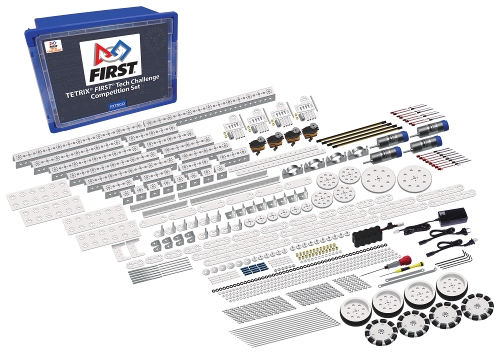
Advantages
- TETRIX is sold on the FIRST dashboard
- TETRIX is easy to envision mechanisms with the patterns on plates and channels
Disadvantages
- TETRIX is easily bendable and thus not very sturdy
- TETRIX units are metric, but uses imperial (U.S. Customary System) for bolts and chain (harder to tension chain)
REV
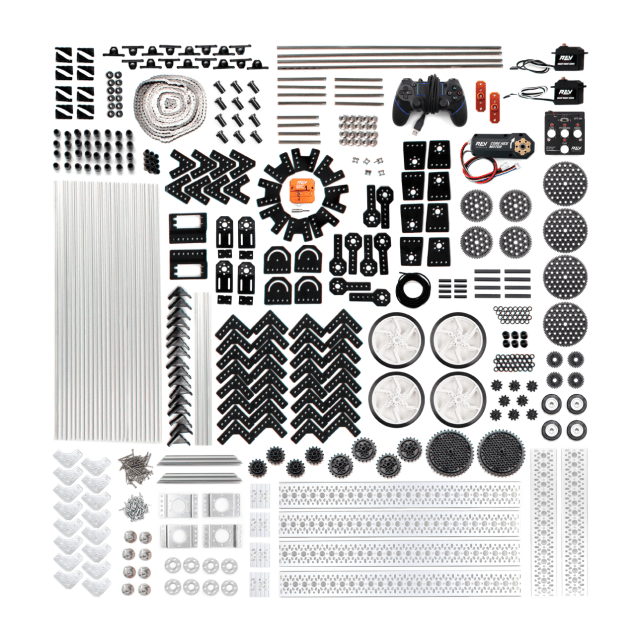
Advantages
- REV is sold on the FIRST dashboard
- REV is easy to get placement very precise on the extrusions
- REV uses the metric system for all of the parts
- REV has both extrusion and channel options (check the kit off the FIRST Dashboard for what is included for your specific season)
Disadvantages
- If using extrusion, REV can be at first harder to envision making a mechanism
- REV screws loosen up over time and can cause the brackets to slide down the extrusions, so plan when you design
AndyMark

Advantages
- AndyMark is easy to buy from the same place you buy the field (unless you buy the game set from the FIRST storefront in September instead of preordering from AndyMark directly)
- AndyMark releases a kit or two specific for the season challenges
- AndyMark has a large variety of wheels for specific purposes
Disadvantages
- You cannot buy AndyMark parts from the FIRST Dashboard
- AndyMark units are metric, but uses imperial (U.S. Customary System) for bolts and chain
- AndyMark parts are not very standardized (higher part tolerance of error)
- It is harder to get specific parts without ordering a kit in which they are included
goBILDA
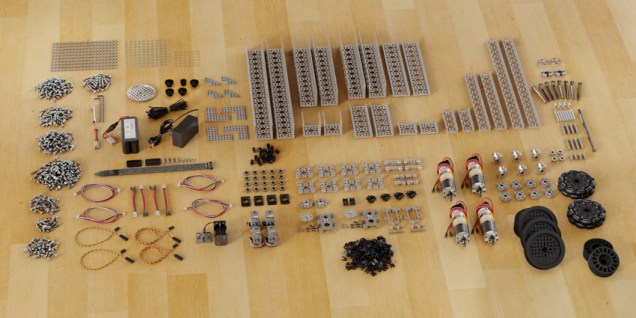
Advantages
- goBILDA uses the metric system
- goBILDA uses an 8mm pitch (spacing in multiples of 8mm) which happens to be the same as LEGO Technic beams!!!
- You can easily transfer LEGO prototypes into goBILDA parts
- goBILDA is very sturdy
- You can apply for a FIRST team discount from the goBILDA company webpage and buy discounted parts as a current FLL or FTC team
Disadvantages
- You cannot buy goBILDA parts from the FIRST dashboard
- goBILDA parts are large and the mass/weight adds up
Robot Parts
Although some teams opt for only using parts from FTC robot kits, FTC teams can use pieces from anywhere, much like FLL teams can use any piece from any LEGO set. You can purchase screws, wheels, structural components, etc. from anywhere — hardware stores, McMaster-Carr, Amazon, etc. You can use any household items, such as tape, plastic containers, silicon mitts, etc. You can also fabricate your own robot parts with a 3D printer, CNC machine, laser cutter, etc. FTC is very open ended as far as parts go!
Illegal Parts and Kits
Do not get too carried away with all the legal robot parts and kits. There are illegal things, too, for safety and fairness.
- Bought kits with multiple degrees of motion, excluding mecanum drive kits — kits like a robot hand kit would not be allowed
- Hydraulics, Pneumatics, and Vacuums — this is different from FLL, but pressurized devices are quite dangerous at this level
- Animal Products — in general for safety, but that means no leather the way the rules are written now
- Liquids or Gels — a possible mess
- Sharp Objects — Sorry, no knives on robots. 🙂 In all seriousness, you need to make sure that anything you cut or buy is not sharp (cover sharp edges or file down).
Read Game Manual 1 for more details and specifications.
Our Experience Mixing Parts
We have personally used a lot of goBILDA and REV parts together. Both are fully metric systems which made it fairly simple to use them together. Note that REV uses M3 hardware while goBILDA uses M4 hardware, but that was not a big challenge for us. We rely on kit parts for basic structure for our chassis and mechanisms, but we custom design most game-specific mechanisms and use custom parts to help us change between kit parts from different manufacturers. We have used CAD along with our 3D-printer to fabricate all custom parts thus far.
Robot and Field Inspection
Very much unlike FLL, FTC robots are inspected for safety and rule following at the beginning of competition. As long as you pay attention to the rules and illegal parts or mechanisms, your team will be just fine. Even if your robot does fail inspection, the event coordinators usually give you plenty of time to get your robot legal and inspect again. The consequences of failing inspection and not being able to fix the legality of your robot within a reasonable amount of time, however, are disqualification from that single competition. In our region, we have seen event coordinators delaying the start of matches until every team could pass inspection. Experienced teams like ours love to help other teams pass inspection and have the ability to play. Come prepared, bring extra parts, and ask for help when needed!
We will discuss the flow of Robot and Field Inspection in more detail in a later article in this series, but bear in mind that in addition to illegal parts, there are also mandatory parts that your robot must have. You are required to have your team number (size requirements in Game Manual 1) on opposite sides of your robot in addition to alliance markers near your numbers (requirements again in Game Manual 1) that you must change out depending on which alliance you are playing as in each match (as randomly assigned).
Programming
We have talked a lot about the mechanical side of the team robot. Now it is time to discuss the programming side of FTC. Programming for FTC may seem much more daunting than programming for FLL, but everything you learned about programming from FLL will carry over and make your time much easier.
Programming Environments
Unlike FIRST LEGO League, programming in environments other than the standard OnBot is much more straightforward and encouraged even by FTC itself. There are three main programming environments: OnBot Blocks, OnBot Java, and Android Studio. FTC has official resources for all of these on their programming resources page.
OnBot Blocks
Sometimes called the “FTC Blocks Programming Tool,” OnBot Blocks can be best described as a lightweight programming tool that is run directly on the Control Hub or Android phone + Expansion Hub. Your team would connect to the robot’s WiFi and program directly on the robot through an internet browser. FTC itself always releases a “Blocks Programming Guide” each season which covers set-up and basic programming and can be found on the FTC programming resources page.
OnBot Blocks may be a good environment in which to start programming, especially if your FLL team has only programmed in Scratch word blocks before. From there, you could choose to learn the text-based Java programming language. Both OnBot Blocks and OnBot Java can be run in the same fashion from the same application, even having the option to convert your code into its Java equivalent. Even if your team is not ready to actually program in Java, it might be very helpful to program in blocks while studying the Java equivalents.
OnBot Java
OnBot Java is basically just the text equivalent of OnBot Blocks. With programming in real Java comes increased challenge and capabilities. This might be a really great next step for your team if you started by programming in OnBot Blocks, since the programming environment would not any different. However, if your team is ready to program in Java right away, Android Studio is probably a better option due to its enhanced capabilities and most of all its version control.
Android Studio
Android Studio is a free Java development environment that is suited for professional-level Java programming. FTC has official resources to use Android Studio and annually releases updated software on gitHub with detailed instructions of how to make your own project to add your own code. If you are ready to program in Java right away, we highly suggest programming in Android Studio if not for anything else but the version control.
Version Control
Unfortunately, version control is the part of programming most teams only remember when it is already too late. This is why we will talk about this now so that we can avoid the pain of completely losing programs, especially on competition day (yes, we have witnessed teams lose their programs at competitions, yikes!).
OnBot
OnBot saves directly to your main hub on your robot. Normally, that is great! However, you cannot download your programs to your computer as you can in FLL. The only way to backup your code is by screenshot. We have not used OnBot in any competition ourselves and, therefore, do not fully understand when or how the robot hub completely erases programs, but we have witnessed multiple teams lose code from OnBot…on competition day. Sadly, all of those teams did not have any screenshots of their code. Let this be a helpful reminder to always screenshot your code after every major change or just after every meeting if you are going to use OnBot.
Android Studio
Android Studio is different in that the programs are saved to your computer and in that it is incredibly easy to use gitHub for version control and sharing across computers. We highly suggest creating a free gitHub account. There are instructions from FTC on creating a new gitHub repository (or project) based on the FTC official code, that is also helpfully saved on gitHub.
Concluding Thoughts
We hope we have given you a better understanding of the standard FTC hardware and software available. If you have any questions about FTC robots or would like to see another part of FTC clarified in an article, feel free to contact us. See the next article in this series: “Transitioning from FLL to FTC: Robot Game.”
 The Moment Makers
2 thoughts on “Transitioning from FLL to FTC: Team Robot”
Comments are closed.